

How a16z built a AI-native admissions system
a16z is one of the most influential venture firms in the world. Their Ecosystem team runs a growing portfolio of programs (fellowships, communities, events) that create a ton of operational work: applications, screening, reviews, follow-ups, and reporting.
Railblocks was hired to build the infrastructure that lets that program engine scale without scaling headcount linearly.
In practice, that meant shipping an AI-native admissions system where one operator could screen ~1,300 applications in ~2 hours because AI did pre-work in advance (signal extraction, normalization, review drafting) and the UI was designed for keyboard-first throughput.
Just as importantly, we built the foundation as a micro-app environment: a secure shared backend, plus a fast way for operators to spin up small, purpose-built apps on top (using Replit as the UI/app infrastructure).
A custom admissions app
a16z’s Ecosystem team runs a growing set of programs. At that scale, the work quickly becomes a pile of operational workflows: intake, screening, review, follow-ups, and reporting.
We were brought in to solve three related needs:
- Custom tools to run programs (fellowships, communities, events)
- A marketing-ops AI system to reduce manual work and improve speed/quality
- A micro-app environment so the team could build AI-powered internal tools with guardrails on top of a shared, solid infrastructure
All of this needed to work inside IT/security constraints (approvals, access boundaries, tool restrictions).
In practice, this pushed us toward an approach where:
- the backend enforces strong boundaries (permissions, auditability, integration scopes), and
- the frontend is built for fast operator loops (review → decide → next).
We shipped a template-ready Admissions app: an AI-powered tool to screen applications for programs/fellowships, designed to be duplicated easily as new programs spun up.
Impact: 1,300 applications screened in ~2 hours by one person
How?
- AI pre-work reduced cognitive load per record
- The UI removed interaction friction (keyboard-first workflow)
- The data model was designed for fast decisions (right information, right time)
Below is what made that possible.
Implementation details
1) AI pre-work
To screen tons of applications, you still need a human to run the review and make the final call. But you want to enable the human with intelligence to make his decision making process as rapid as possible.
The key is to treat AI as a background worker that prepares the “decision packet”:
- summarize the application
- extract key signals and flags
- normalize messy inputs (e.g., location)
- propose tags and structured fields that the UI can filter/group on
The operator only focuses on reviews and decisions instead of reading raw text and building context from scratch.
We implemented (and iterated on) AI Reviews in the backend so outputs were:
- tied to the source-of-truth record,
- stored as structured fields,
- auditable and reproducible,
- available instantly in the UI at decision time.
2) Custom UI development
For admissions, processing thousands of applications in prebuilt software is a nightmare: the UI isn’t designed to make screening easier, so operators end up fighting the tool instead of moving quickly through decisions.
So we built a review UI that was 100% adapted to their operators: the screen showed exactly the context needed to decide fast, with a keyboard-first flow and an auto-advance loop.
And we went a step further by enabling operators to customize the UI themselves (not just request changes) so they could tune the review surface, defaults, and interaction patterns (including small things like keyboard shortcuts) as the workflow evolved.
In practice, that looked like:
- a full-screen review surface with the right context visible at decision time
- a keyboard-first flow (shortcuts for deterministic actions, e.g. approve/reject)
- auto-advance to the next record the moment a decision is made
- zero context switching, hunting, or scrolling
3) Workflow-native system
When the workflow isn’t explicit, the real system becomes Slack threads, spreadsheets, and people’s memory. We designed the Admissions app so the workflow lives in the product, so progress, ownership, and decisions are always visible and not dependent on “who remembers what.”
In practice, this meant a few simple but critical UX & workflow building blocks:
- clear stages that map to real work (Applied → In review → Second review → Accepted/Rejected)
- queues that surface what matters now (needs review, needs a second look, blocked)
- clear ownership and handoff points
- a short, consistent set of next actions on every application
- one review screen where the decision happens (application + AI summary + reviewer call)
The result is centralized data (decisions, notes, and status changes live in one system), less coordination, fewer missed applications, and smoother async collaboration.
4) Stack integration
The admissions system couldn’t be a standalone island; it needed to connect cleanly to the tools a16z already uses.
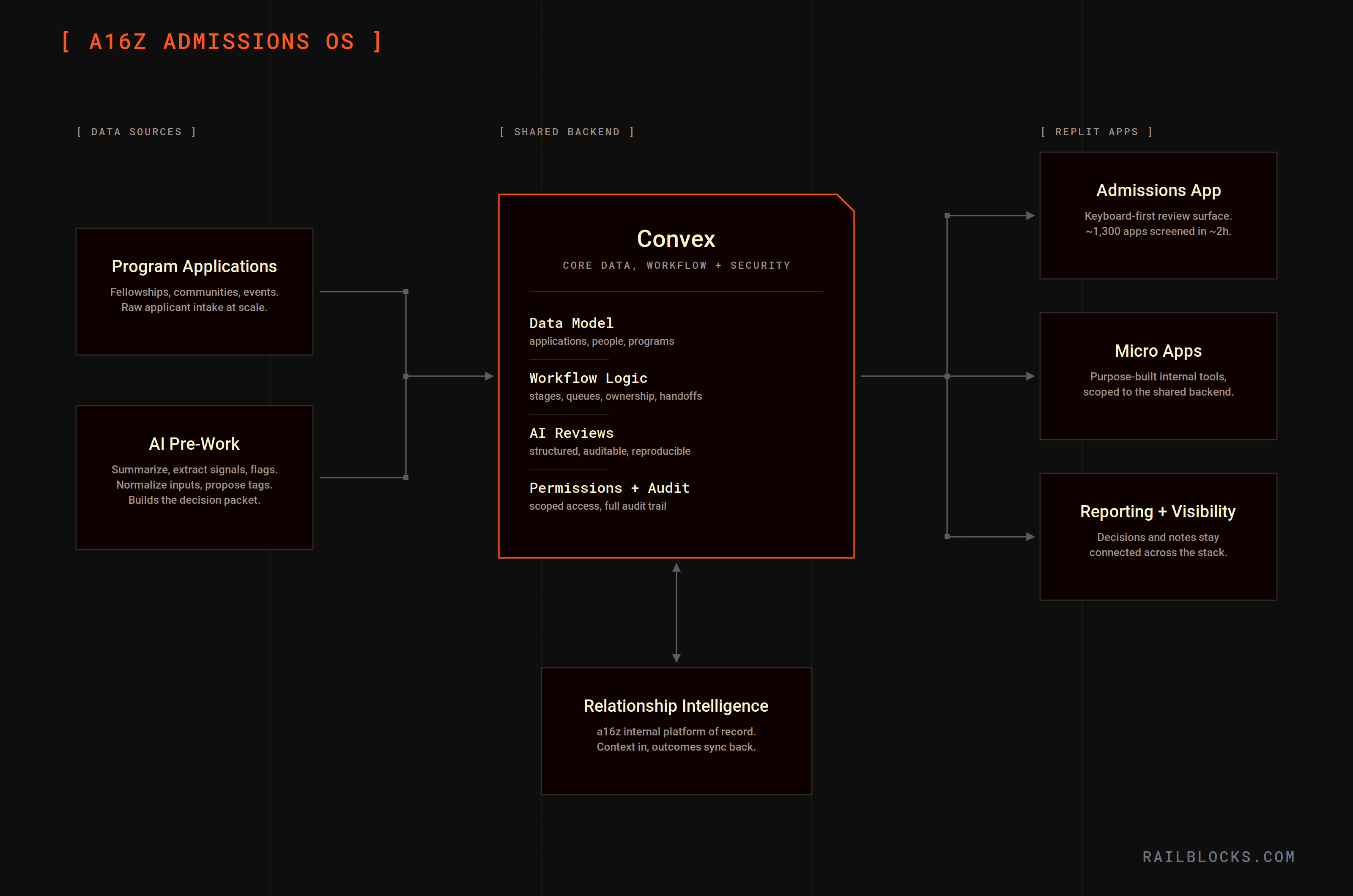
a16z’s have their own custom internal relationship intelligence platform where relationship data already lives. We designed the system to work with it, keeping relationship context and program outcomes connected.
The admissions system kept its internal workflow logic, but shared the right business outcomes back to the platform (who applied, what happened, current status, key notes). We also made sure the data could be reused for reporting and internal visibility without re-building one-off integrations, and we put guardrails in place so integrations didn’t become a backdoor.
5) Agentic infrastructure
We made a deliberate split between a strong shared backend and fast, purpose-built frontends.
Convex was the shared backend: it held the core data model (applications, people, programs) and the workflow logic, and it enforced the security fundamentals (permissions, scoped access, audit trail).
Replit was the UI layer: separate, program-specific apps that could move quickly without putting the backend at risk.
This made it safer to operate inside IT/security constraints, faster to iterate on workflows, and easier to launch new programs without rebuilding the foundation each time.
6) Micro-app development with guardrails
Beyond the main Admissions app, we designed the platform so the team could ship small “micro apps” on top of the same backend, both quickly and safely.
Micro apps could live as separate Replit projects (clean ownership boundaries), while access to backend capabilities stayed scoped (an app can only do what it’s meant to do). Shared building blocks (data model, permissions, AI review outputs) lived in the backend, so micro apps could focus on the last mile: a purpose-built interface for one workflow.
That combination is what makes a self-serve model possible without creating shadow systems: teams can experiment and move fast, while IT/security keeps visibility and control.
Outcomes
The most visible outcome was speed: one operator could screen ~1,300 applications in ~2 hours because the system did the prep work (AI reviews) and the interface was built for rapid, repeatable decisions.
The entire ecosystem workflow became easier to run and manage:
- Less manual coordination: progress, ownership, and decisions lived in the system.
- Cleaner collaboration: multiple reviewers could work asynchronously without losing track of what was done and what was next.
- Centralized outcomes: program decisions and key notes stayed connected to the rest of the stack (so the organization could actually reuse the work downstream).
Finally, we left behind a foundation that could outlive the initial Admissions workflow:
- a shared backend with security guardrails,
- a micro-app environment for fast iteration,
- and a pattern for empowering operators to build additional AI-powered internal apps without rebuilding from scratch each time.
.svg)
a16z is one of the most influential venture firms in the world. Their Ecosystem team runs a growing portfolio of programs (fellowships, communities, events) that create a ton of operational work: applications, screening, reviews, follow-ups, and reporting.
Railblocks was hired to build the infrastructure that lets that program engine scale without scaling headcount linearly.
In practice, that meant shipping an AI-native admissions system where one operator could screen ~1,300 applications in ~2 hours because AI did pre-work in advance (signal extraction, normalization, review drafting) and the UI was designed for keyboard-first throughput.
Just as importantly, we built the foundation as a micro-app environment: a secure shared backend, plus a fast way for operators to spin up small, purpose-built apps on top (using Replit as the UI/app infrastructure).
A custom admissions app
a16z’s Ecosystem team runs a growing set of programs. At that scale, the work quickly becomes a pile of operational workflows: intake, screening, review, follow-ups, and reporting.
We were brought in to solve three related needs:
- Custom tools to run programs (fellowships, communities, events)
- A marketing-ops AI system to reduce manual work and improve speed/quality
- A micro-app environment so the team could build AI-powered internal tools with guardrails on top of a shared, solid infrastructure
All of this needed to work inside IT/security constraints (approvals, access boundaries, tool restrictions).
In practice, this pushed us toward an approach where:
- the backend enforces strong boundaries (permissions, auditability, integration scopes), and
- the frontend is built for fast operator loops (review → decide → next).
We shipped a template-ready Admissions app: an AI-powered tool to screen applications for programs/fellowships, designed to be duplicated easily as new programs spun up.
Impact: 1,300 applications screened in ~2 hours by one person
How?
- AI pre-work reduced cognitive load per record
- The UI removed interaction friction (keyboard-first workflow)
- The data model was designed for fast decisions (right information, right time)
Below is what made that possible.
Implementation details
1) AI pre-work
To screen tons of applications, you still need a human to run the review and make the final call. But you want to enable the human with intelligence to make his decision making process as rapid as possible.
The key is to treat AI as a background worker that prepares the “decision packet”:
- summarize the application
- extract key signals and flags
- normalize messy inputs (e.g., location)
- propose tags and structured fields that the UI can filter/group on
The operator only focuses on reviews and decisions instead of reading raw text and building context from scratch.
We implemented (and iterated on) AI Reviews in the backend so outputs were:
- tied to the source-of-truth record,
- stored as structured fields,
- auditable and reproducible,
- available instantly in the UI at decision time.
2) Custom UI development
For admissions, processing thousands of applications in prebuilt software is a nightmare: the UI isn’t designed to make screening easier, so operators end up fighting the tool instead of moving quickly through decisions.
So we built a review UI that was 100% adapted to their operators: the screen showed exactly the context needed to decide fast, with a keyboard-first flow and an auto-advance loop.
And we went a step further by enabling operators to customize the UI themselves (not just request changes) so they could tune the review surface, defaults, and interaction patterns (including small things like keyboard shortcuts) as the workflow evolved.
In practice, that looked like:
- a full-screen review surface with the right context visible at decision time
- a keyboard-first flow (shortcuts for deterministic actions, e.g. approve/reject)
- auto-advance to the next record the moment a decision is made
- zero context switching, hunting, or scrolling
3) Workflow-native system
When the workflow isn’t explicit, the real system becomes Slack threads, spreadsheets, and people’s memory. We designed the Admissions app so the workflow lives in the product, so progress, ownership, and decisions are always visible and not dependent on “who remembers what.”
In practice, this meant a few simple but critical UX & workflow building blocks:
- clear stages that map to real work (Applied → In review → Second review → Accepted/Rejected)
- queues that surface what matters now (needs review, needs a second look, blocked)
- clear ownership and handoff points
- a short, consistent set of next actions on every application
- one review screen where the decision happens (application + AI summary + reviewer call)
The result is centralized data (decisions, notes, and status changes live in one system), less coordination, fewer missed applications, and smoother async collaboration.
4) Stack integration
The admissions system couldn’t be a standalone island; it needed to connect cleanly to the tools a16z already uses.
a16z’s have their own custom internal relationship intelligence platform where relationship data already lives. We designed the system to work with it, keeping relationship context and program outcomes connected.
The admissions system kept its internal workflow logic, but shared the right business outcomes back to the platform (who applied, what happened, current status, key notes). We also made sure the data could be reused for reporting and internal visibility without re-building one-off integrations, and we put guardrails in place so integrations didn’t become a backdoor.
5) Agentic infrastructure
We made a deliberate split between a strong shared backend and fast, purpose-built frontends.
Convex was the shared backend: it held the core data model (applications, people, programs) and the workflow logic, and it enforced the security fundamentals (permissions, scoped access, audit trail).
Replit was the UI layer: separate, program-specific apps that could move quickly without putting the backend at risk.
This made it safer to operate inside IT/security constraints, faster to iterate on workflows, and easier to launch new programs without rebuilding the foundation each time.
6) Micro-app development with guardrails
Beyond the main Admissions app, we designed the platform so the team could ship small “micro apps” on top of the same backend, both quickly and safely.
Micro apps could live as separate Replit projects (clean ownership boundaries), while access to backend capabilities stayed scoped (an app can only do what it’s meant to do). Shared building blocks (data model, permissions, AI review outputs) lived in the backend, so micro apps could focus on the last mile: a purpose-built interface for one workflow.
That combination is what makes a self-serve model possible without creating shadow systems: teams can experiment and move fast, while IT/security keeps visibility and control.
Outcomes
The most visible outcome was speed: one operator could screen ~1,300 applications in ~2 hours because the system did the prep work (AI reviews) and the interface was built for rapid, repeatable decisions.
The entire ecosystem workflow became easier to run and manage:
- Less manual coordination: progress, ownership, and decisions lived in the system.
- Cleaner collaboration: multiple reviewers could work asynchronously without losing track of what was done and what was next.
- Centralized outcomes: program decisions and key notes stayed connected to the rest of the stack (so the organization could actually reuse the work downstream).
Finally, we left behind a foundation that could outlive the initial Admissions workflow:
- a shared backend with security guardrails,
- a micro-app environment for fast iteration,
- and a pattern for empowering operators to build additional AI-powered internal apps without rebuilding from scratch each time.
.png)
.png)

.png)
-min.png)
-min.png)
-min.png)
.png)


.svg)

