

How we built Primer’s company brain on top of Notion
.png)
Primer is rebuilding the US K-12 education system through their network of low-cost, teacher-lead small private schools. By the time Railblocks got involved, it was a Series B startup with roughly 60 HQ staff split across an SF office, remote state-level operators, and dozens of campuses across four states.
We built a knowledge & context OS for them. Within weeks, the entire org had one place to find decisions, track projects, and store knowledge. Repeated Slack questions dropped dramatically. Onboarding new hires went from weeks of chaos to a structured, self-serve experience. Every hour spent building the system paid back many times over.
Towards a context system
Primer is tackling a uniquely hard problem: software, academics, staffing, local operations, real estate, and more. As you'd expect, keeping context aligned got harder as Primer scaled.
As Primer grew across HQ, remote operators, and campuses, decisions and updates increasingly happened in different places and at different speeds. People often knew what was true inside their immediate team or thread, but it wasn’t always easy for others to quickly find the latest answer, the owner, or the “why” behind a decision.
Over time, this created a predictable loop: information lived across tools, documentation was fragmented and teams defaulted to asking questions because searching felt slower and less certain than pinging the person who knew.
We framed the engagement around one outcome:
Put all work context and knowledge in one place, make it connected and queryable, by humans and by AI.
We used Notion as the UI layer. What we worked on is context + knowledge operating system that could also carry docs, project management, tasks, and meeting artifacts without fragmenting the truth.
Phase 1: Discovery
We started with structured discovery: 8 interviews across functions to understand how teams work today and where the friction is highest.
The consistent picture:
- People want one place to find the truth quickly (knowledge, decisions, initiatives) instead of Slack archaeology or re-asking questions.
- The biggest risk was adoption and cost-to-maintain: anything that requires heavy maintenance will fail.
Phase 2: System design
We designed a simple, interconnected operating system in Notion optimized for low maintenance and high leverage: a small number of shared objects, wired together with clear relations so work context becomes browseable and durable (not just searchable).
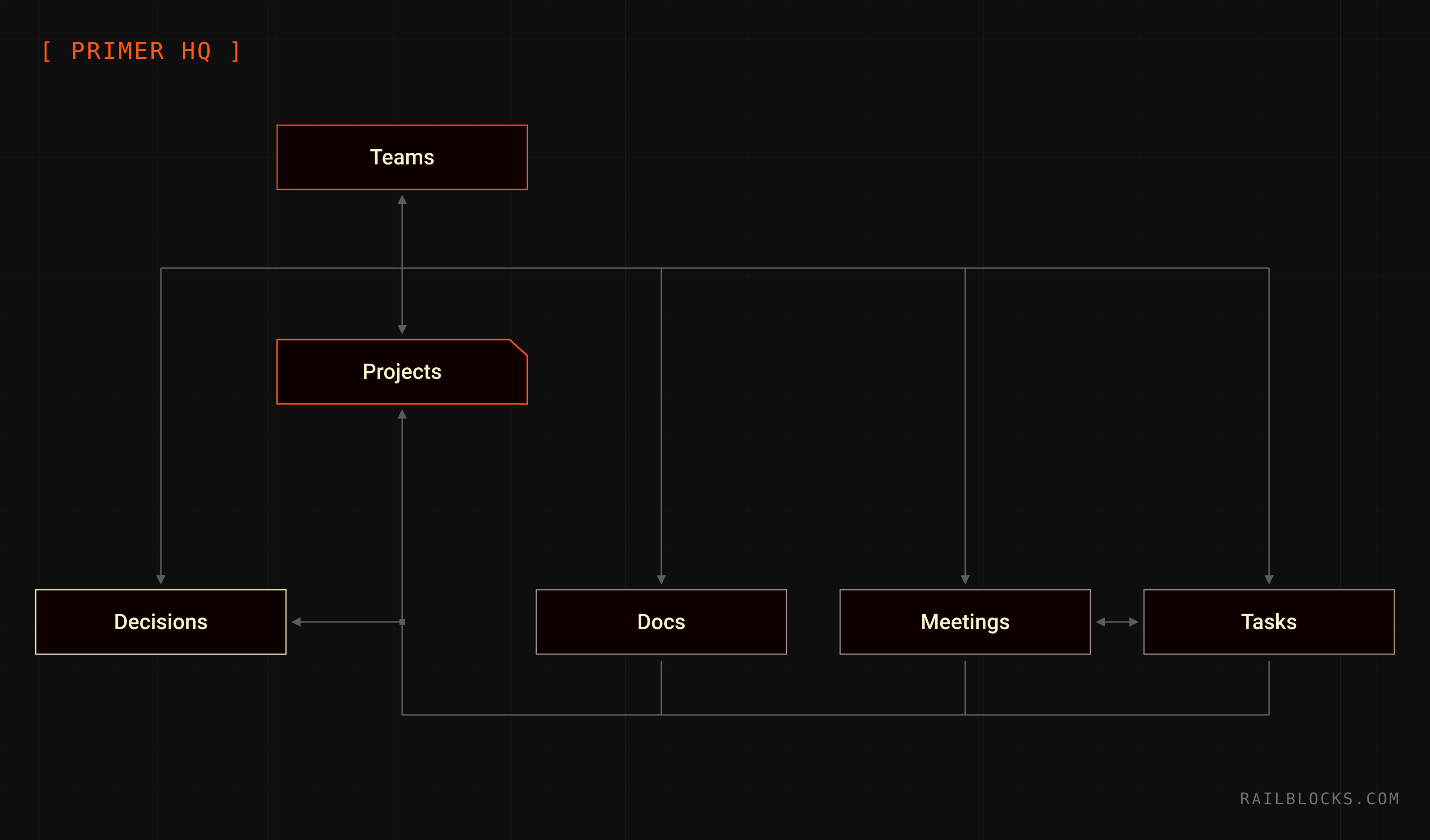
At the core are six objects:
- Teams: the main way to organize work. Every doc, project, task, meeting, and decision belongs to one or more teams.
- Projects: initiatives people are actively running, with an owner, a status, and one main page that links everything.
- Docs: the single place for documentation, with a simple status (draft → review → approved) and clear tags (team / project / type).
- Meetings: meeting notes (+ AI transcripts) that are easy to find later because they’re linked to teams & projects.
- Tasks: a shared task system that can link back to the team, project, and docs it supports.
- Decisions: short write‑ups of key decisions/changes, shared broadly, with a simple “read” acknowledgement.
The point wasn’t to add process. It was to store the knowledge and context behind work and make “what’s true” linkable and easy to find.
Phase 3: Adoption
The biggest mistake companies make when implementing a new system is shipping everything at once.
We prefer rolling things out in phases to avoid over-engineering a system and overwhelming internal users.
1. Light launch. Limited number of objects. Leadership Team only, as a sandbox. The goal is to validate the system.
2. Team involvement. Before rolling out to the full org, we ran 1-on-1 calls with team members. Not to train them, but to involve them.
3. Initial rollout. Training modules, video walkthroughs, live Q&As, open office hours, a mandatory first-week checklist.
4. System expansion. Adding more objects and AI features progressively (with support and training).
A system nobody uses is worth nothing.
The system is only as good as its adoption. Beyond those phases, here are the things that made a difference:
- Involve people before you launch. When team members help shape the system, they’re more likely to use it.
- Design for safety. People hesitate to use a knowledge system when they’re not sure what’s private. Make new docs private by default, then intentionally share them.
- Nail the first 2 minutes. A new system can feel overwhelming at first. Jumping on 2-minute call with new users and show them exactly where to start (onboarding, buttons, reassurance) is the way to break that tension.
- Make adoption visible. We built an Adoption Scoreboard inside the workspace that tracks each person's contributions across all databases. Every person has a level, numbers update daily. The leaderboard is visible to everyone. It creates healthy peer pressure.
Phase 4: AI superpowers
Once you have a solid system, adopted by users, with centralized & clean data, AI can create value and compound.
By this point, the system had already created a single place for work context, but people still defaulted to asking questions in Slack, digging through threads, or DMing the “person who knows.”
Onboarding new employees also depended heavily on tribal knowledge.
Primer Agent was introduced as the next step: a way to answer common questions fast, route people to the right doc/project/decision/owner, and reduce the day‑to‑day support load.
Beyond that we built a lot of agents centered around 2 use cases:
- Context hygiene (i.e. exclude drafts, duplicate detection, respect private content, update notifications).
- Learning loop: a memory layer that stores Q&A, tracks corrections, and gradually becomes an FAQ / institutional memory. The goal was to make the system compound. Slack questions now actually get answers and if those answers are wrong or incomplete, new answers by humans improve the knowledge base.
System extension
Notion is where context should live, but it shouldn’t be a walled garden.
As the system matured, the natural next step was to connect the knowledge OS to operational data (Hex/BI, product data, support tooling) so answers aren’t limited to what’s written in docs. They can also surface truth from the underlying tools.
This was explicitly discussed as an opportunity area (and constraint): what’s possible today, where native integrations break, and where custom integrations / MCP-style connectors become the lever.
In a nutshell:
- Notion holds the canonical context and decisions.
- BI/product/tools hold the ground-truth events and metrics.
- Agents bridge them to answer questions in Slack with both context + data.
Wired-In Privacy
As adoption increased, privacy became a forcing function.
Primer has both compliance responsibilities (FERPA/PII) and functional needs (HR, finance, leadership work) that can’t be “public by default.”
So we implemented one-click full privacy for docs/meetings: private content disappears from search for non-authorized users, but still lives inside the same system.
This matters because it removes the #1 reason people create shadow docs: “I can’t put this in the system.”
Now they could.
Knowledge as a living organism
The #1 outcome we achieved was to make the entire company queryable with a system where knowledge compounds instead of creating silos.
The entire Primer team started behaving differently:
- Work became easier to find because it had a home.
- Decisions became auditable and searchable.
- Adoption became measurable, factual.
- AI became more accurate because the context became structured.
- The same system could hold tons of different objects (knowledge, projects, tasks, and meetings), without fragmenting truth.
- People planned work earlier (who’s involved, what depends on what) and had less back-and-forth midstream.
.svg)
Primer is rebuilding the US K-12 education system through their network of low-cost, teacher-lead small private schools. By the time Railblocks got involved, it was a Series B startup with roughly 60 HQ staff split across an SF office, remote state-level operators, and dozens of campuses across four states.
We built a knowledge & context OS for them. Within weeks, the entire org had one place to find decisions, track projects, and store knowledge. Repeated Slack questions dropped dramatically. Onboarding new hires went from weeks of chaos to a structured, self-serve experience. Every hour spent building the system paid back many times over.
Towards a context system
Primer is tackling a uniquely hard problem: software, academics, staffing, local operations, real estate, and more. As you'd expect, keeping context aligned got harder as Primer scaled.
As Primer grew across HQ, remote operators, and campuses, decisions and updates increasingly happened in different places and at different speeds. People often knew what was true inside their immediate team or thread, but it wasn’t always easy for others to quickly find the latest answer, the owner, or the “why” behind a decision.
Over time, this created a predictable loop: information lived across tools, documentation was fragmented and teams defaulted to asking questions because searching felt slower and less certain than pinging the person who knew.
We framed the engagement around one outcome:
Put all work context and knowledge in one place, make it connected and queryable, by humans and by AI.
We used Notion as the UI layer. What we worked on is context + knowledge operating system that could also carry docs, project management, tasks, and meeting artifacts without fragmenting the truth.
Phase 1: Discovery
We started with structured discovery: 8 interviews across functions to understand how teams work today and where the friction is highest.
The consistent picture:
- People want one place to find the truth quickly (knowledge, decisions, initiatives) instead of Slack archaeology or re-asking questions.
- The biggest risk was adoption and cost-to-maintain: anything that requires heavy maintenance will fail.
Phase 2: System design
We designed a simple, interconnected operating system in Notion optimized for low maintenance and high leverage: a small number of shared objects, wired together with clear relations so work context becomes browseable and durable (not just searchable).
At the core are six objects:
- Teams: the main way to organize work. Every doc, project, task, meeting, and decision belongs to one or more teams.
- Projects: initiatives people are actively running, with an owner, a status, and one main page that links everything.
- Docs: the single place for documentation, with a simple status (draft → review → approved) and clear tags (team / project / type).
- Meetings: meeting notes (+ AI transcripts) that are easy to find later because they’re linked to teams & projects.
- Tasks: a shared task system that can link back to the team, project, and docs it supports.
- Decisions: short write‑ups of key decisions/changes, shared broadly, with a simple “read” acknowledgement.
The point wasn’t to add process. It was to store the knowledge and context behind work and make “what’s true” linkable and easy to find.
Phase 3: Adoption
The biggest mistake companies make when implementing a new system is shipping everything at once.
We prefer rolling things out in phases to avoid over-engineering a system and overwhelming internal users.
1. Light launch. Limited number of objects. Leadership Team only, as a sandbox. The goal is to validate the system.
2. Team involvement. Before rolling out to the full org, we ran 1-on-1 calls with team members. Not to train them, but to involve them.
3. Initial rollout. Training modules, video walkthroughs, live Q&As, open office hours, a mandatory first-week checklist.
4. System expansion. Adding more objects and AI features progressively (with support and training).
A system nobody uses is worth nothing.
The system is only as good as its adoption. Beyond those phases, here are the things that made a difference:
- Involve people before you launch. When team members help shape the system, they’re more likely to use it.
- Design for safety. People hesitate to use a knowledge system when they’re not sure what’s private. Make new docs private by default, then intentionally share them.
- Nail the first 2 minutes. A new system can feel overwhelming at first. Jumping on 2-minute call with new users and show them exactly where to start (onboarding, buttons, reassurance) is the way to break that tension.
- Make adoption visible. We built an Adoption Scoreboard inside the workspace that tracks each person's contributions across all databases. Every person has a level, numbers update daily. The leaderboard is visible to everyone. It creates healthy peer pressure.
Phase 4: AI superpowers
Once you have a solid system, adopted by users, with centralized & clean data, AI can create value and compound.
By this point, the system had already created a single place for work context, but people still defaulted to asking questions in Slack, digging through threads, or DMing the “person who knows.”
Onboarding new employees also depended heavily on tribal knowledge.
Primer Agent was introduced as the next step: a way to answer common questions fast, route people to the right doc/project/decision/owner, and reduce the day‑to‑day support load.
Beyond that we built a lot of agents centered around 2 use cases:
- Context hygiene (i.e. exclude drafts, duplicate detection, respect private content, update notifications).
- Learning loop: a memory layer that stores Q&A, tracks corrections, and gradually becomes an FAQ / institutional memory. The goal was to make the system compound. Slack questions now actually get answers and if those answers are wrong or incomplete, new answers by humans improve the knowledge base.
System extension
Notion is where context should live, but it shouldn’t be a walled garden.
As the system matured, the natural next step was to connect the knowledge OS to operational data (Hex/BI, product data, support tooling) so answers aren’t limited to what’s written in docs. They can also surface truth from the underlying tools.
This was explicitly discussed as an opportunity area (and constraint): what’s possible today, where native integrations break, and where custom integrations / MCP-style connectors become the lever.
In a nutshell:
- Notion holds the canonical context and decisions.
- BI/product/tools hold the ground-truth events and metrics.
- Agents bridge them to answer questions in Slack with both context + data.
Wired-In Privacy
As adoption increased, privacy became a forcing function.
Primer has both compliance responsibilities (FERPA/PII) and functional needs (HR, finance, leadership work) that can’t be “public by default.”
So we implemented one-click full privacy for docs/meetings: private content disappears from search for non-authorized users, but still lives inside the same system.
This matters because it removes the #1 reason people create shadow docs: “I can’t put this in the system.”
Now they could.
Knowledge as a living organism
The #1 outcome we achieved was to make the entire company queryable with a system where knowledge compounds instead of creating silos.
The entire Primer team started behaving differently:
- Work became easier to find because it had a home.
- Decisions became auditable and searchable.
- Adoption became measurable, factual.
- AI became more accurate because the context became structured.
- The same system could hold tons of different objects (knowledge, projects, tasks, and meetings), without fragmenting truth.
- People planned work earlier (who’s involved, what depends on what) and had less back-and-forth midstream.
.png)

.png)
-min.png)
-min.png)
-min.png)
.png)


.svg)

