

How Dfns migrated from Salesforce to a custom system on top of Attio
A CRM that started to feel like a liability
Dfns is a wallet infrastructure company selling to technical teams and larger enterprises. Their go-to-market motion mixes product-led entry with sales-assisted enterprise deals, plus marketing channels like events, a newsletter, and partnerships.
As the company grew, Salesforce became their “default” source of truth. It did what Salesforce usually does: it collected records. But it didn’t reflect how the business actually operated.
Over time, a familiar drift set in:
- The data model stopped matching reality.
- Simple changes started to feel like a project: new fields, workflows, reports, and custom objects were slow and high-friction.
- Integrations were hard to build. Work was owned “around” Salesforce instead of within an evolvable system.
- Maintenance costs climbed and the experience never really felt tailored to Dfns.
The CRM was a (very expensive) place to store information, but not a place where the business could reliably run.
The monolith vs. modular decision
This wasn’t a simple “Salesforce vs Attio” comparison.
It was a question of architecture:
- Do you accept a monolithic platform and spend your time adapting yourself to it?
- Or do you choose a flexible core and keep the option to build custom workflows when you hit edges?
Dfns wanted more ownership and change velocity than Salesforce could allow, without rebuilding everything from scratch (i.e. Gmail syncs, native enrichments, workflow builder the team can use to self-serve).
Attio landed in that middle path. It gave Dfns a solid baseline out of the box:
- A flexible data model for CRM primitives (companies, people, deals)
- A modern UI teams would actually use
- Native workflow automation for common internal actions
But the real unlock was the App SDK: a clean way to build dedicated apps and integrations on top of Attio.
We also went in with eyes open about tradeoffs. Every SaaS has limits, including Attio. Their dashboarding is not the best, they lack some basic features like formula fields. The right strategy is to anticipate where custom apps will be needed, and build around accordingly.
The migration
The migration was not “export/import.” Once we treated the CRM as an operational layer, the work became a redesign of how revenue and customer operations flow end-to-end.
1) Data foundation
We consolidated Salesforce plus a long tail of external sources (event attendee sheets, LinkedIn exports, and other ad hoc lists) into Airtable to:
- Aggregate everything into one consistent data model
- Dedupe records across sources
- Enrich companies/contacts and validate key fields
- Standardize the final set of properties and field options (picklists/statuses)
2) Attio as the action center
We rebuilt the CRM so it could support both PLG and enterprise motions.
That meant getting the fundamentals right:
- Deal workflows and pipeline tracking that match how the team sells
- Company and contact management with deduplication patterns
- Standardized views so teams share the same truth surface
On top of that foundation, we implemented operational “glue” that makes the system actually run day-to-day:
- Region-based ownership assignment
- Auto-linking companies to deals by email domain
- Pipeline hygiene rules and naming conventions to keep reporting consistent
3) A modular integration layer
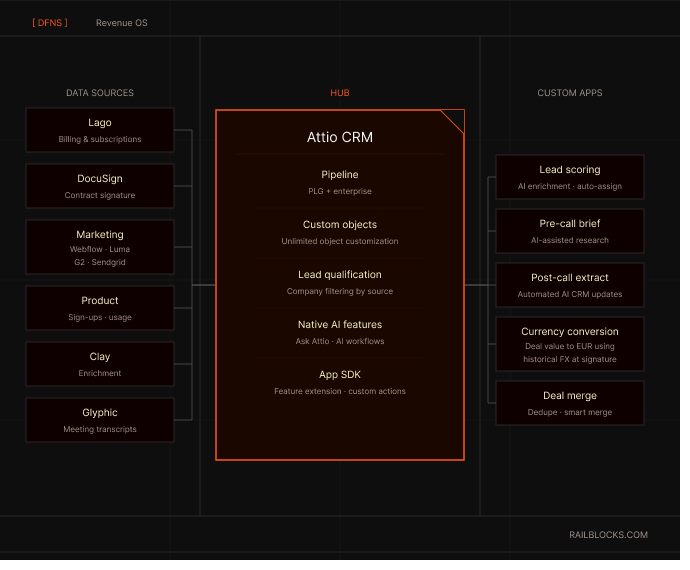
Instead of stuffing everything into one platform, we treated Attio as the hub.
The integration approach was intentionally hybrid:
- Use Attio’s native workflows for internal rules where they’re strong.
- Connect tools to Attio with code to make the data flow.
- Build custom apps to compensate for Attio’s limitations.
This gave fast iteration early, with a path to harden the system as usage matured.
Integrations
Billing & subscriptions: Attio ↔ Lago ↔ Dfns product
We needed billing to stop being a parallel system and become part of the revenue workflow.
Lago became the billing source of truth, while Attio stayed the operational layer, so we built a tight loop where Lago subscription state is reflected in Attio, and CRM actions can propagate back into the product.
It supports both self-serve and sales-assisted deals, including edge cases like custom pricing and start dates.
Concretely, that loop enabled:
- Subscription creation from inside Attio
- Real-time billing state sync into CRM
- Handling of custom pricing, non-standard start dates, and mid-cycle modifications
- Overdue invoice automation and alerts
Contracting flow
Contracts were another place where “CRM data” and “operational reality” kept drifting apart. If DocuSign lived outside the system, sales ops would end up doing the same work twice: generating documents in one place, then manually updating Attio when something changed.
So we made DocuSign a first-class workflow inside Attio:
- Generate + send from Attio: reps trigger contract generation from the deal record (with dynamic fields like sender/signatory names) and send for signature without leaving the CRM.
- Status sync back to the deal: envelope status updates flow back into Attio so downstream stages and internal notifications can be automated (e.g. when a contract is completed/signed).
- Guardrails around who signs: enforce the right internal sign-off patterns so contracts don’t go out without the appropriate responsible party signing.
- Clean document hygiene: signed PDFs follow a consistent naming convention (date signed + client name + deal name) so the archive stays usable over time.
Marketing attribution
As Dfns pushed harder on events and lifecycle marketing, we built integrations that turn signals into CRM actions:
- Website visits + UTM tracking (Webflow forms and product sign-ups)
- Newsletter clicks and outbound email flows (SendGrid)
- Luma event attendance (moved from Zapier to a custom Attio app with backfill)
- G2 review signals
This supports end-to-end funnel tracking: newsletter click → lead → deal → revenue.
& much more
A usable CRM depends on the “unsexy glue.”
We implemented the rules and conventions that make workflows predictable:
- Auto-link companies to deals based on email domain
- Naming conventions that keep pipelines readable
- Ownership assignment rules (for example, by region)
- A process for handling duplicates and non-obvious merges
These details are the difference between “a CRM exists” and “the CRM runs.”
Beyond routing, we also built a set of custom Attio apps to cover workflow edges:
Intelligence
The migration wasn’t just about switching CRM vendors, it was about building a system that can generate leverage.
When the data model is clean, sources are unified, and workflows are instrumented, you can go beyond “automation” and start augmenting the team with decision-grade intelligence: better prioritization, better timing, better context, and fewer blind spots.
Below are the main AI-driven capabilities we enabled (or unlocked) on top of the new stack.
1) Data quality as the foundation for intelligence
AI is only useful if the underlying data is trustworthy. A big part of the work was making intelligence possible by improving the inputs:
- Unified identity + deduplication across companies, people, and deals (so signals roll up correctly)
- Standardized fields + picklists (so models and rules don’t break on inconsistent values)
- Reliable event capture from marketing/product/billing sources (so “intent” is measurable)
- Backfills + validation loops (so historical context isn’t lost)
2) AI-powered enrichment
We managed to turn raw records into usable context:
- Clay ↔ Attio bi-directional enrichment: pull enrichment signals in, push curated fields back, with guardrails (audit trail, field-level access control, send limits, per-record evaluation).
- Company research synthesis: turn enrichment + web/company signals into a short, structured brief (what they do, why now, likely use case, key qualifiers).
- Derived qualification fields: infer or suggest values like segment, use case, urgency, and fit indicators based on structured + unstructured signals.
3) Lead intelligence
When 20–30 new companies flow in per day from different sources, the goal is not “capture everything”, it’s to separate noise from pipeline.
- Lead qualification (MQL filter): apply explicit criteria to qualify inbound companies and set them to MQL.
- Lead scoring: compute a score using enrichment data (industry, headcount, revenue, etc.) + engagement signals.
- Automated lifecycle progression (MQL → SQL): transition leads to SQL when they cross a scoring threshold (and route/assign accordingly).
- Human-in-the-loop review surface: keep a queue for edge cases (uncertain qualification, incomplete enrichment, conflicting signals) so sales doesn’t waste time.
4) Conversation intelligence
A lot of the most valuable GTM information lives in calls, not in fields. We treated transcripts as a first-class data source.
- Glyphic transcript ingestion: ingest meeting recordings/transcripts as structured inputs into the RevOps system.
- Post-call AI extraction: parse transcripts to automatically write back:
- Key facts and constraints
- Stakeholders and roles
- Use case / qualification signals
- Objections, risks, and blockers
- Next steps and action items
- Stage change suggestions / “what changed since last call”
- Consistency + completeness: reduce variance in how reps take notes and keep CRM fields updated.
5) Pre-call intelligence
- Pre-call AI research briefs inside Attio: auto-generate a one-page briefing that combines:
- CRM history (touchpoints, pipeline stage, prior notes)
- News and external context
- Product usage signals (when available)
- Campaign touchpoints (events, newsletters, UTMs)
- Hypotheses: likely use case + suggested discovery angles
6) Attribution & intent intelligence
- Automated campaign-based attribution: systematically track first-touch source and full engagement history (campaign enrollments) and roll up signals across people/deals to the company.
- Intent signals ingestion (e.g., G2): automatically capture and route “high intent” activity so sales follows up when timing is best.
- Funnel analytics readiness: once attribution and lifecycle states are reliable, you can compute drop-offs, conversion rates, and channel ROI without bespoke spreadsheets.
7) Operational intelligence & reliability
AI needs a stable & secure system to operate efficiently.
- Monitoring (Datadog): instrumentation + alerting for webhook health and integration failures, so automations and AI outputs remain trustworthy.
- Guardrails: We collaborate directly with the tech & security team to ensure clear ownership, validation rules, and safe fallbacks when automation confidence is low.
The impact
After the migration, the visible win was adoption: teams actually used the CRM, which made the data more trustworthy.
The deeper win was change velocity. CRM changes stopped being mini-projects, and became normal daily iteration.
Once product events, billing states, and GTM workflows were connected, the organization got real operational alignment:
- ~90% reduction in CRM spend
- Improved operator experience (almost no limit to CRM feature requests with very fast delivery)
- Full funnel metric visibility and revenue attribution
- Little to no manual data entry
- Ability to upsell more effectively from real signals
We “removed Salesforce”, yes. But in the process, we created a foundation Dfns can keep building on at scale.
Over time, the highest leverage work shifts from “CRM setup” to “system intelligence.” This is also where the stack starts to look less like “a CRM” and more like “a revenue OS”.
.svg)
A CRM that started to feel like a liability
Dfns is a wallet infrastructure company selling to technical teams and larger enterprises. Their go-to-market motion mixes product-led entry with sales-assisted enterprise deals, plus marketing channels like events, a newsletter, and partnerships.
As the company grew, Salesforce became their “default” source of truth. It did what Salesforce usually does: it collected records. But it didn’t reflect how the business actually operated.
Over time, a familiar drift set in:
- The data model stopped matching reality.
- Simple changes started to feel like a project: new fields, workflows, reports, and custom objects were slow and high-friction.
- Integrations were hard to build. Work was owned “around” Salesforce instead of within an evolvable system.
- Maintenance costs climbed and the experience never really felt tailored to Dfns.
The CRM was a (very expensive) place to store information, but not a place where the business could reliably run.
The monolith vs. modular decision
This wasn’t a simple “Salesforce vs Attio” comparison.
It was a question of architecture:
- Do you accept a monolithic platform and spend your time adapting yourself to it?
- Or do you choose a flexible core and keep the option to build custom workflows when you hit edges?
Dfns wanted more ownership and change velocity than Salesforce could allow, without rebuilding everything from scratch (i.e. Gmail syncs, native enrichments, workflow builder the team can use to self-serve).
Attio landed in that middle path. It gave Dfns a solid baseline out of the box:
- A flexible data model for CRM primitives (companies, people, deals)
- A modern UI teams would actually use
- Native workflow automation for common internal actions
But the real unlock was the App SDK: a clean way to build dedicated apps and integrations on top of Attio.
We also went in with eyes open about tradeoffs. Every SaaS has limits, including Attio. Their dashboarding is not the best, they lack some basic features like formula fields. The right strategy is to anticipate where custom apps will be needed, and build around accordingly.
The migration
The migration was not “export/import.” Once we treated the CRM as an operational layer, the work became a redesign of how revenue and customer operations flow end-to-end.
1) Data foundation
We consolidated Salesforce plus a long tail of external sources (event attendee sheets, LinkedIn exports, and other ad hoc lists) into Airtable to:
- Aggregate everything into one consistent data model
- Dedupe records across sources
- Enrich companies/contacts and validate key fields
- Standardize the final set of properties and field options (picklists/statuses)
2) Attio as the action center
We rebuilt the CRM so it could support both PLG and enterprise motions.
That meant getting the fundamentals right:
- Deal workflows and pipeline tracking that match how the team sells
- Company and contact management with deduplication patterns
- Standardized views so teams share the same truth surface
On top of that foundation, we implemented operational “glue” that makes the system actually run day-to-day:
- Region-based ownership assignment
- Auto-linking companies to deals by email domain
- Pipeline hygiene rules and naming conventions to keep reporting consistent
3) A modular integration layer
Instead of stuffing everything into one platform, we treated Attio as the hub.
The integration approach was intentionally hybrid:
- Use Attio’s native workflows for internal rules where they’re strong.
- Connect tools to Attio with code to make the data flow.
- Build custom apps to compensate for Attio’s limitations.
This gave fast iteration early, with a path to harden the system as usage matured.
Integrations
Billing & subscriptions: Attio ↔ Lago ↔ Dfns product
We needed billing to stop being a parallel system and become part of the revenue workflow.
Lago became the billing source of truth, while Attio stayed the operational layer, so we built a tight loop where Lago subscription state is reflected in Attio, and CRM actions can propagate back into the product.
It supports both self-serve and sales-assisted deals, including edge cases like custom pricing and start dates.
Concretely, that loop enabled:
- Subscription creation from inside Attio
- Real-time billing state sync into CRM
- Handling of custom pricing, non-standard start dates, and mid-cycle modifications
- Overdue invoice automation and alerts
Contracting flow
Contracts were another place where “CRM data” and “operational reality” kept drifting apart. If DocuSign lived outside the system, sales ops would end up doing the same work twice: generating documents in one place, then manually updating Attio when something changed.
So we made DocuSign a first-class workflow inside Attio:
- Generate + send from Attio: reps trigger contract generation from the deal record (with dynamic fields like sender/signatory names) and send for signature without leaving the CRM.
- Status sync back to the deal: envelope status updates flow back into Attio so downstream stages and internal notifications can be automated (e.g. when a contract is completed/signed).
- Guardrails around who signs: enforce the right internal sign-off patterns so contracts don’t go out without the appropriate responsible party signing.
- Clean document hygiene: signed PDFs follow a consistent naming convention (date signed + client name + deal name) so the archive stays usable over time.
Marketing attribution
As Dfns pushed harder on events and lifecycle marketing, we built integrations that turn signals into CRM actions:
- Website visits + UTM tracking (Webflow forms and product sign-ups)
- Newsletter clicks and outbound email flows (SendGrid)
- Luma event attendance (moved from Zapier to a custom Attio app with backfill)
- G2 review signals
This supports end-to-end funnel tracking: newsletter click → lead → deal → revenue.
& much more
A usable CRM depends on the “unsexy glue.”
We implemented the rules and conventions that make workflows predictable:
- Auto-link companies to deals based on email domain
- Naming conventions that keep pipelines readable
- Ownership assignment rules (for example, by region)
- A process for handling duplicates and non-obvious merges
These details are the difference between “a CRM exists” and “the CRM runs.”
Beyond routing, we also built a set of custom Attio apps to cover workflow edges:
Intelligence
The migration wasn’t just about switching CRM vendors, it was about building a system that can generate leverage.
When the data model is clean, sources are unified, and workflows are instrumented, you can go beyond “automation” and start augmenting the team with decision-grade intelligence: better prioritization, better timing, better context, and fewer blind spots.
Below are the main AI-driven capabilities we enabled (or unlocked) on top of the new stack.
1) Data quality as the foundation for intelligence
AI is only useful if the underlying data is trustworthy. A big part of the work was making intelligence possible by improving the inputs:
- Unified identity + deduplication across companies, people, and deals (so signals roll up correctly)
- Standardized fields + picklists (so models and rules don’t break on inconsistent values)
- Reliable event capture from marketing/product/billing sources (so “intent” is measurable)
- Backfills + validation loops (so historical context isn’t lost)
2) AI-powered enrichment
We managed to turn raw records into usable context:
- Clay ↔ Attio bi-directional enrichment: pull enrichment signals in, push curated fields back, with guardrails (audit trail, field-level access control, send limits, per-record evaluation).
- Company research synthesis: turn enrichment + web/company signals into a short, structured brief (what they do, why now, likely use case, key qualifiers).
- Derived qualification fields: infer or suggest values like segment, use case, urgency, and fit indicators based on structured + unstructured signals.
3) Lead intelligence
When 20–30 new companies flow in per day from different sources, the goal is not “capture everything”, it’s to separate noise from pipeline.
- Lead qualification (MQL filter): apply explicit criteria to qualify inbound companies and set them to MQL.
- Lead scoring: compute a score using enrichment data (industry, headcount, revenue, etc.) + engagement signals.
- Automated lifecycle progression (MQL → SQL): transition leads to SQL when they cross a scoring threshold (and route/assign accordingly).
- Human-in-the-loop review surface: keep a queue for edge cases (uncertain qualification, incomplete enrichment, conflicting signals) so sales doesn’t waste time.
4) Conversation intelligence
A lot of the most valuable GTM information lives in calls, not in fields. We treated transcripts as a first-class data source.
- Glyphic transcript ingestion: ingest meeting recordings/transcripts as structured inputs into the RevOps system.
- Post-call AI extraction: parse transcripts to automatically write back:
- Key facts and constraints
- Stakeholders and roles
- Use case / qualification signals
- Objections, risks, and blockers
- Next steps and action items
- Stage change suggestions / “what changed since last call”
- Consistency + completeness: reduce variance in how reps take notes and keep CRM fields updated.
5) Pre-call intelligence
- Pre-call AI research briefs inside Attio: auto-generate a one-page briefing that combines:
- CRM history (touchpoints, pipeline stage, prior notes)
- News and external context
- Product usage signals (when available)
- Campaign touchpoints (events, newsletters, UTMs)
- Hypotheses: likely use case + suggested discovery angles
6) Attribution & intent intelligence
- Automated campaign-based attribution: systematically track first-touch source and full engagement history (campaign enrollments) and roll up signals across people/deals to the company.
- Intent signals ingestion (e.g., G2): automatically capture and route “high intent” activity so sales follows up when timing is best.
- Funnel analytics readiness: once attribution and lifecycle states are reliable, you can compute drop-offs, conversion rates, and channel ROI without bespoke spreadsheets.
7) Operational intelligence & reliability
AI needs a stable & secure system to operate efficiently.
- Monitoring (Datadog): instrumentation + alerting for webhook health and integration failures, so automations and AI outputs remain trustworthy.
- Guardrails: We collaborate directly with the tech & security team to ensure clear ownership, validation rules, and safe fallbacks when automation confidence is low.
The impact
After the migration, the visible win was adoption: teams actually used the CRM, which made the data more trustworthy.
The deeper win was change velocity. CRM changes stopped being mini-projects, and became normal daily iteration.
Once product events, billing states, and GTM workflows were connected, the organization got real operational alignment:
- ~90% reduction in CRM spend
- Improved operator experience (almost no limit to CRM feature requests with very fast delivery)
- Full funnel metric visibility and revenue attribution
- Little to no manual data entry
- Ability to upsell more effectively from real signals
We “removed Salesforce”, yes. But in the process, we created a foundation Dfns can keep building on at scale.
Over time, the highest leverage work shifts from “CRM setup” to “system intelligence.” This is also where the stack starts to look less like “a CRM” and more like “a revenue OS”.
.png)
.png)

.png)
-min.png)
-min.png)
-min.png)
.png)


.svg)

